
Imagine you change one color code in your design file, and suddenly every button, banner, and background across your entire app updates instantly. No manual hunting through CSS files. No broken links. Just pure, instant consistency. That is the promise of design tokens. But now, add artificial intelligence into the mix, and that promise becomes something far more powerful-and slightly more complex.
We are standing at a weird crossroads in interface design. On one side, we have traditional design systems built by humans, token by token. On the other, we have AI tools that can generate entire UIs from text prompts. The question isn't just "how do we make pretty screens?" It is "how do we keep those screens consistent when an AI is building them faster than we can read?" This guide breaks down how design tokens act as the bridge between human intent and machine execution in modern UI architecture.
What Are Design Tokens, Really?
Let’s strip away the jargon for a second. A design token is simply a named value. Instead of hardcoding `#FF5733` (that specific orange) directly into your button style, you create a token called `color-primary-action`. Later, if your brand decides to switch from orange to blue, you update the token once. Every component using that token updates automatically.
These tokens originated with Salesforce around 2016, but they’ve evolved significantly. Today, they are the single source of truth for your visual language. They store colors, typography sizes, spacing units, shadows, and border radii. Think of them as the DNA of your interface. If components are the body parts, tokens are the genetic instructions telling each part what it looks like.
In technical terms, these values live in JSON files because JSON is flexible and readable by both humans and machines. You have two main types:
- Primitive Tokens: These are raw values. Hex codes like `#000000`, pixel values like `16px`, or font families like `Roboto`. They have no context on their own.
- Semantic Tokens: These provide meaning. Instead of `#000000`, you use `text-body-default`. Instead of `16px`, you use `spacing-medium`. These tokens reference primitives but tell developers *why* a value is being used.
This distinction matters. Primitive tokens are the ingredients; semantic tokens are the recipe. AI thrives on this structure because it can learn the patterns of recipes even if it doesn’t understand the taste of the ingredients.
The Architecture: How Tokens Connect Design to Code
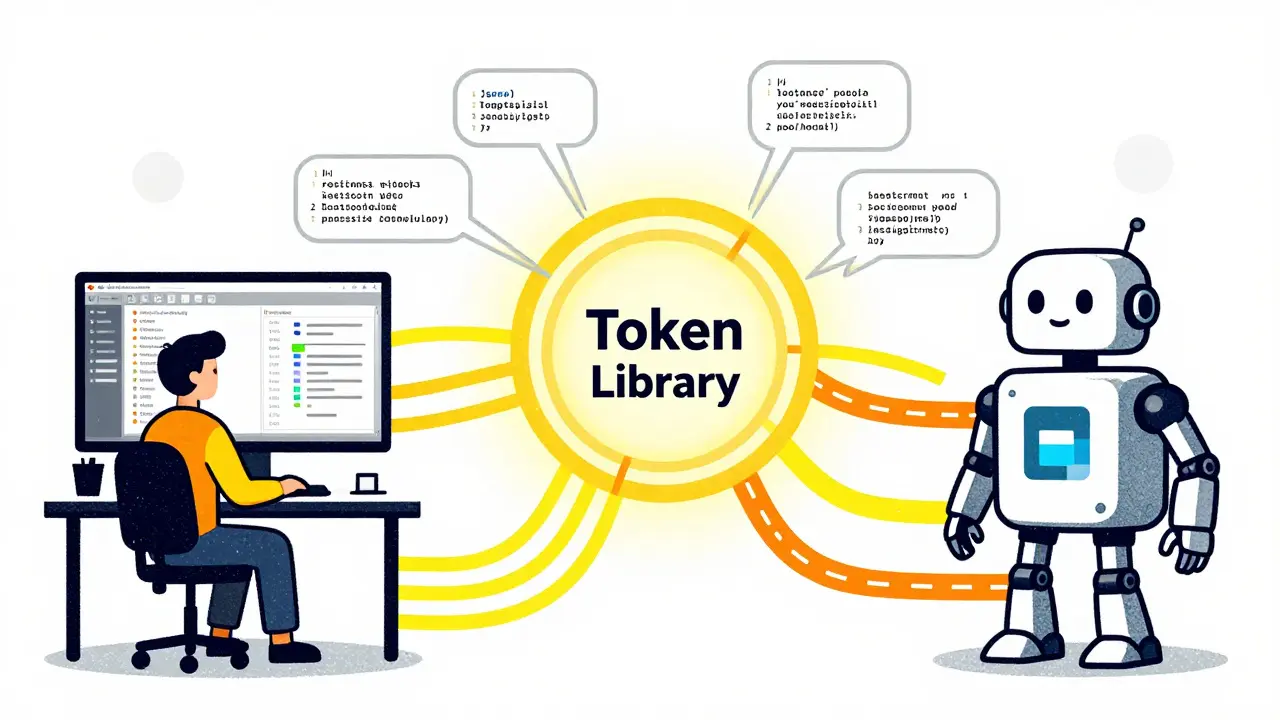
If you look under the hood of a modern design system, the architecture usually follows a central hub model. At the center sits your token library (often stored in a repository like GitHub). Surrounding it is a transformer layer-tools like Style Dictionary or custom scripts-that convert those JSON tokens into formats different platforms understand.
Here is how the flow typically works:
- You define tokens in a neutral format (JSON/YAML).
- A transformer processes these tokens.
- The output generates platform-specific code: CSS variables for the web, XML resources for Android, Swift constants for iOS, and so on.
- Simultaneously, these tokens sync back to your design tool, like Figma, ensuring designers see the exact same values developers are coding against.
Figma’s introduction of Variables in March 2023 was a game-changer here. Before Variables, designers worked with static styles. Now, tokens can be stored as dynamic variables within Figma itself. When you update a token in code, it propagates to the design file. When you tweak a variable in Figma, it can push updates to the codebase. This bidirectional sync reduces the "handoff gap" where designs drift from implementation.
| Feature | Manual CSS Variables | AI-Enhanced Token System |
|---|---|---|
| Update Speed | Slow (manual file edits) | Instant (automated propagation) |
| Consistency Rate | ~60% (prone to human error) | ~97% (enforced by AI validation) |
| Theming Support | Limited (requires manual overrides) | Native (via token modes) |
| Setup Complexity | Low | High (initial configuration required) |
AI’s Role: From Automation to Generation
So, where does AI fit in? Initially, AI helped automate the boring stuff. Tools could scan your Figma files and suggest token names based on usage patterns. If you had ten shades of blue, the AI might label them `blue-100` through `blue-900`. That’s helpful, but not revolutionary.
The real shift happened between 2022 and 2024. AI began generating tokens from scratch. Imagine feeding an AI a brand guideline document and asking it to produce a full set of design tokens. The AI analyzes the hex codes, font hierarchies, and spacing rules, then outputs a structured JSON file with semantic naming conventions. According to UXPin data from late 2023, this reduced manual token creation work by up to 50%.
More importantly, AI handles the mapping between primitive and semantic tokens. Humans often struggle with naming. Is this gray `background-surface` or `background-elevated`? An AI trained on thousands of design systems can analyze the context-where the color is used, what contrast ratios it meets-and assign the most logical semantic name. In tests, these AI suggestions were accurate about 80% of the time right out of the box.
However, there is a catch. AI is great at pattern recognition but poor at nuance. As David Herring, a UX researcher, pointed out in 2024, over-reliance on AI can homogenize design systems. If every company uses the same AI model to generate tokens, interfaces start looking identical. Human oversight remains critical to ensure brand personality survives the automation process.
Theming with Modes: Light, Dark, and Beyond
One of the biggest headaches in UI development is supporting multiple themes. Light mode, dark mode, high-contrast mode for accessibility, maybe even seasonal themes for holidays. Traditionally, this meant writing separate CSS files or massive media query blocks. It was messy and error-prone.
Design tokens solve this through "modes." A mode is essentially a variation of token values. You define your base tokens (light mode), then create a second set of values for dark mode. The token names stay the same (`color-background-primary`), but the underlying values change.
When you integrate AI into this workflow, things get interesting. AI can predict which tokens need to change for a new theme. For example, if you’re creating a dark mode, the AI knows that text colors need higher contrast and background colors need to be darker. It can auto-generate the dark mode token set based on accessibility standards like WCAG 2.2.
Material Design 3 exemplifies this approach. Google’s design system uses dynamic color tokens that adapt to user preferences. If a user picks a wallpaper with lots of green, Material 3 extracts that hue and generates a cohesive palette across the entire OS. This level of adaptive theming is only possible because the underlying architecture relies on robust, AI-assisted token management.
Implementation Challenges and Real-World Pitfalls
Don’t let the hype fool you. Implementing an AI-driven token system is not plug-and-play. Here are the real-world hurdles teams face:
1. The Initial Setup Tax
For small projects with fewer than 10 components, setting up a full token architecture is overkill. You spend more time configuring the AI transformers than you save in development. Enterprise applications with 50+ components benefit massively, but startups might find traditional CSS variables more efficient initially.
2. Legacy System Integration
Many companies have existing codebases built before tokens existed. Migrating hardcoded values to tokens is painful. AI can help identify candidates for tokenization, but the actual refactoring requires careful human intervention. A GitHub issue from August 2024 noted that 23% of users struggled with integrating AI-enhanced transformers into legacy systems.
3. Naming Convention Conflicts
AI suggests names, but teams still argue about them. One designer calls it `spacing-large`; another prefers `gap-xl`. Without clear governance, AI-generated tokens can become chaotic. Successful implementations establish strict naming guidelines *before* introducing AI tools.
4. Accessibility Compliance
AI can check contrast ratios, but it doesn’t always understand context. A token might pass WCAG AA standards technically, but fail in practice due to low visual hierarchy. Always validate AI-generated tokens with real users and accessibility audits.
Best Practices for Getting Started
If you’re ready to bring design tokens and AI into your workflow, follow these steps:
- Start with Primitives: Define your core colors, fonts, and spacing scales first. Keep these simple and universal.
- Create Semantic Layers: Map primitives to semantic tokens based on usage. Use clear, descriptive names.
- Implement Modes Early: Don’t wait until launch to think about dark mode. Build your token architecture to support multiple modes from day one.
- Use AI as an Assistant, Not a Replacement: Let AI handle repetitive tasks like generating scale variations or suggesting names. Keep humans in the loop for strategic decisions.
- Document Everything: Tools like Zeroheight or Storybook help document your tokens. Clear documentation prevents confusion as your system grows.
Remember, the goal isn’t to automate everything. It’s to remove friction so designers and developers can focus on solving user problems, not arguing over hex codes.
Are design tokens necessary for small projects?
Not necessarily. For very small projects with limited components, the overhead of setting up a token system may outweigh the benefits. Traditional CSS variables or inline styles might be sufficient. However, if you plan to scale or add features later, starting with tokens early saves significant refactoring time down the road.
How does AI improve design token accuracy?
AI improves accuracy by analyzing large datasets of design patterns. It can detect inconsistencies that humans might miss, such as slight variations in spacing or contrast ratios. Additionally, AI can automatically map primitive values to semantic meanings based on contextual usage, reducing naming errors and improving system coherence.
Can I use design tokens without AI?
Absolutely. Many successful design systems operate without AI. Tools like Style Dictionary allow you to manage tokens manually. AI enhances efficiency and scalability, but it is not a requirement. The core value of tokens comes from their structure and centralized management, regardless of whether AI assists in their creation.
What is the difference between primitive and semantic tokens?
Primitive tokens are raw design values like `#FF0000` or `16px`. They have no inherent meaning beyond their visual appearance. Semantic tokens describe the purpose of a value, such as `error-text` or `button-padding`. Semantic tokens reference primitives, allowing you to change the underlying value without breaking the logic of your design system.
How do design tokens help with accessibility?
Design tokens enable programmatic enforcement of accessibility standards. By defining tokens for text colors and backgrounds, you can run automated checks to ensure all combinations meet WCAG contrast requirements. AI tools can further enhance this by predicting accessible color palettes and flagging violations during the design phase, before code is written.



Vishal Bharadwaj
1 June, 2026 - 03:35 AM
look i have been doing this for years and you are missing the point. tokens are just css variables with extra steps. nobody needs ai to tell them what a primary color is. it is basic logic. also your json structure is bloated.
you say consistency is key but in reality developers just ignore the token names and hardcode anyway because the semantic naming is confusing. who decides if something is spacing-medium or gap-xl? it is subjective garbage. ai will not fix human stupidity.
also salesforce did not invent tokens, they just packaged an old concept. stop giving credit where none is due. and don't get me started on figma variables. it is just another walled garden trying to lock us in. real engineers use raw css. everything else is bloatware for people who can't code properly.
anoushka singh
2 June, 2026 - 22:44 PM
hey guys! i was reading this while eating lunch and honestly it sounded super complicated lol. like why do we need all these fancy words when we can just pick a color picker?
i tried setting up tokens once and my brain melted. too many files, too much config. i just want my button to be blue and stay blue. why does it need a genetic instruction set? sounds like sci-fi stuff that doesn't work in real life.
but hey, if ai can do it for me then sure, sign me up. i am definitely not going to read any json files though. that looks painful. maybe someone can make a plugin that just says 'make it pretty' and done?
Jitendra Singh
3 June, 2026 - 04:01 AM
I think both sides have valid points here. The complexity is real, but so is the benefit of scale. I have seen teams struggle with inconsistent colors across large apps, and tokens really help there.
It is not about replacing humans, but helping them avoid tedious tasks. The AI part seems promising for generating initial structures, but as mentioned, human oversight is crucial. We should view this as a tool to enhance our workflow rather than a replacement for design thinking. It takes time to set up, yes, but the long-term maintenance savings are significant for larger projects.
ANAND BHUSHAN
4 June, 2026 - 17:31 PM
tokens are fine for big companies. for small sites they are waste of time. just use simple css. keep it simple stupid.
Indi s
5 June, 2026 - 13:38 PM
i understand why people might feel overwhelmed by all this technical jargon. it is a lot to take in at first. but i think the idea behind tokens is actually quite nice once you get used to it. it helps everyone on the team speak the same language.
instead of arguing about hex codes, you talk about brand values. it makes collaboration easier. i know it feels like extra work at the start, but it saves headaches later. maybe start small and see how it goes. no need to rush into ai tools right away. take your time and learn the basics first.